
Website localization is the process of adapting your site’s language, content and user experience so it feels native to a specific market, not just readable in it. Translation is one part. The rest is currency, formats, imagery, tone, payment options, legal wording and the technical setup that lets search engines and visitors find the right language version. This guide covers what to adapt, the steps in order, the SEO basics, what it costs and how to choose a service.
TL;DR
- Localization adapts the whole experience for a market (language, currency, formats, images, layout), while translation only converts the words.
- Start with one target market and language, audit what needs adapting, then translate with native-level human linguists and test before launch.
- Give each language its own URL, use hreflang annotations and avoid automatic redirects based on a visitor’s perceived language.
- Cost depends mostly on word count, language pair, content type and how much design and technical work is involved. Our certified translation starts from $0.12 per word and standard translation from $0.08 per word.
- Plan for updates: when your source pages change, the translated versions must change too.
Table of Contents
- What website localization actually means
- Localization vs translation: when words alone are enough
- What to localize on your website
- The steps, in order
- Technical and SEO setup
- What website localization costs
- Choosing a website localization service
- Perspective: why we put people first
- Get your site content translated
- FAQ
- Sources
What website localization actually means
The World Wide Web Consortium (W3C) defines localization as adapting a product, application or document content to the language, cultural and other requirements of a specific target market, known as a locale. That is a broader job than swapping English sentences for Spanish or Vietnamese ones.
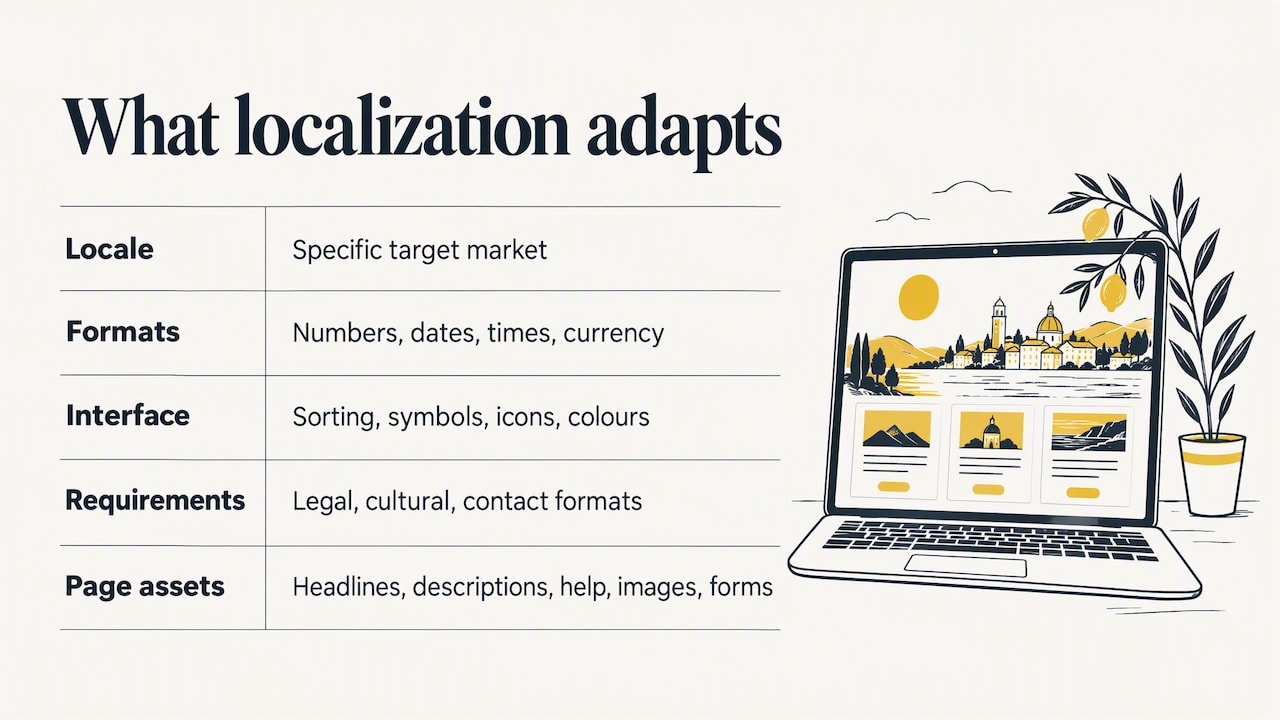
In practice, the W3C notes that localization can include numeric, date and time formats, currency, sorting, symbols, icons and colours, culturally sensitive text and graphics, legal requirements, address and contact formats, and readability of different scripts. Website content localization is the same idea applied to the individual assets on your pages: headlines, product descriptions, help articles, images, forms and calls to action.
The point of all this is simple. Adapting to market changes is a basic business discipline, and a website that speaks to a new audience in its own terms is a direct example of it. Visitors who find familiar formats, familiar wording and familiar payment options spend less effort working out how your site functions, and that tends to make them more comfortable using it.
Localization versus internationalization
The two terms are often confused. The W3C separates them: internationalization is the design and development work that makes a product or content easy to localize, while localization adapts the finished product for a particular locale. Internationalization comes first. If your templates cannot handle longer text, a different reading direction or a different date format, every new language becomes a rebuild.
Localization vs translation: when words alone are enough
Translation converts words from one language to another. Shopify’s guide to localization puts the difference this way: localization adapts the entire user experience, including local language, cultural context, currency, payment methods, domain suffixes, design and layout.
Translation alone can be enough when:
- the content is informational and has no cultural or transactional element, such as a PDF guide, a policy page or a set of instructions;
- you are serving a community in Australia who already use your site in English but want key pages in their first language;
- the audience is small and the goal is clarity, not conversion.
It is not enough when you sell, take bookings or collect personal details. Nielsen Norman Group cautions that literal translation may not adequately localize content for international users, and notes that tone of voice, standards, units of measure, product information and domain terminology may need local adaptation.
Why machine output is risky
Automated tools are fast, and they are fine for getting the gist of a page. But Digital NSW warns that automated translation can miss key context and tone, and can cause severe problems for languages that read right to left. Its guidance recommends certified human translators and language-specific pages as best practice. For anything that carries legal weight, prices or health information, human review is the safer standard.
What to localize on your website
A useful way to plan is to list every element a visitor touches. The categories below come up on almost every project.
| Element | What to adapt |
|---|---|
| Body copy and headlines | Style, register and idiom; wording that could carry double meanings or offensive connotations in the target language |
| Currency and pricing | Local currency, tax display, rounding conventions |
| Dates, times, numbers, units | Local formats, such as day-month-year, 24-hour clock, metric or imperial |
| Images and icons | Photos, symbols and colours that suit the culture and avoid unintended meanings |
| Forms and addresses | Name order, address and phone formats, required fields |
| Payment and delivery | Payment methods people actually use locally; shipping and returns information |
| Legal and compliance text | Terms, privacy notices and regulated claims under local rules |
| Layout and design | Room for longer words, correct fonts, right-to-left mirroring where needed |
| Support information | Local contact details, hours and language of support |
The Phrase guide to content localization lists the same families of change: style and register, images, symbols, colours, currency, date and time formats, and wording that might be misread. Shopify adds payment methods and domain suffixes.
Don’t forget accessibility
Digital NSW advises checking that your site supports the formatting, spacing and reading direction of each language. It also says multilingual content should be written in plain, simple text and checked for accessibility, including logical screen-reader order, alternative text, suitable fonts and correct right-to-left handling. Treat this as part of localization, not an extra.
The steps, in order
Most good processes follow the same path. Here is a sequence that works for small and mid-sized sites.
- Choose the market and the language. Do not localize for the whole world at once. Pick one target country or language, based on where your customers or enquiries already come from.
- Audit your content. Decide what must be localized, what can be translated only, and what can stay in English. Product pages, checkout, contact pages and legal pages usually come first.
- Prepare the site technically. Keep text out of images, store strings separately from code, and make sure templates can expand for longer text. This is the internationalization work described above.
- Translate with native-level experts. Use professional linguists who know the subject matter and the market. For a Victorian or NSW audience, check whether the translators are certified.
- Adapt the experience. Apply the table above: currency, formats, imagery, payment options and layout.
- Test before launch. Check how the translated pages display, whether links and forms work, and whether accessibility holds in each language. The Australian Government Architecture web-content standard recommends user-centred testing, especially with people who depend on assistive technology, and human-validated multilingual support for important information.
- Launch, then learn. Release the key pages first, watch how visitors behave and fix what they stumble on.
- Keep it current. The Victorian Government’s guidelines on multilingual information online say to review content periodically and to update translated material whenever the original English version changes.
That last step is where many projects fail. A translated page that goes out of date is worse than none, because it tells visitors your business is not paying attention.
Technical and SEO setup
Getting the structure right means the right people see the right version, and search engines index all of them.
One URL per language
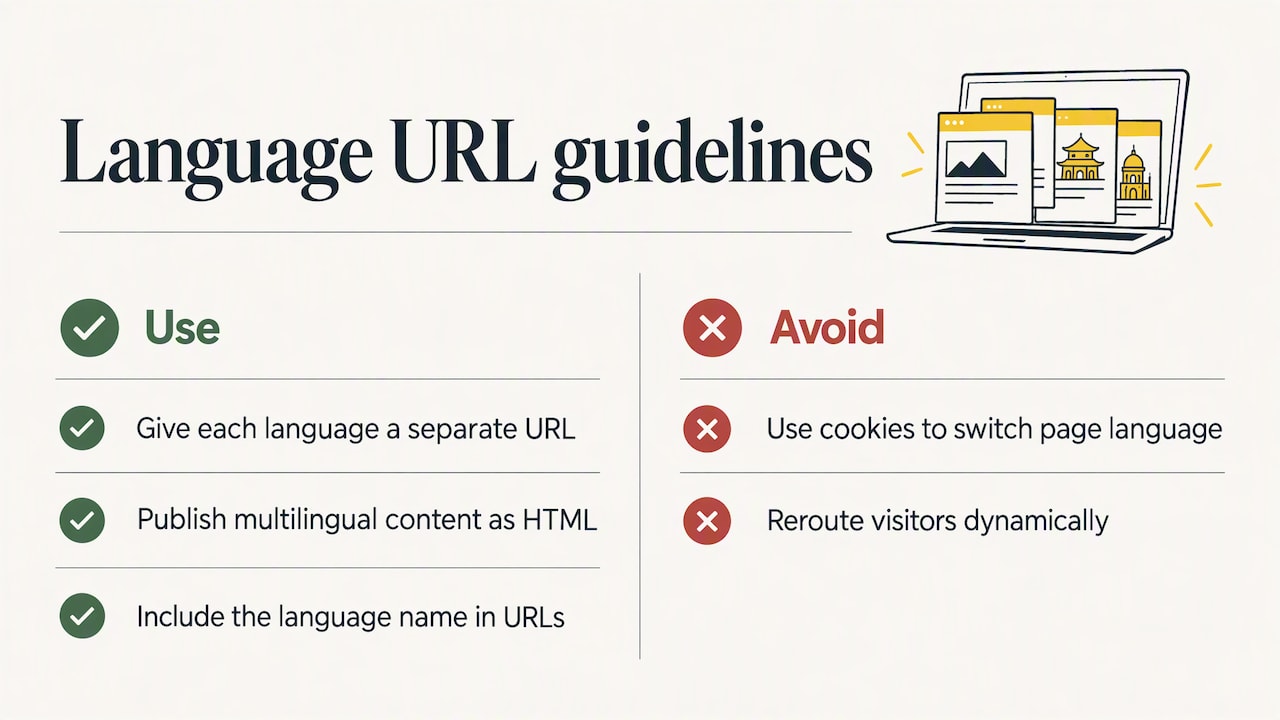
Google Search Central recommends separate URLs for each language version, instead of using cookies or browser settings to change the page language. It also explains why: Googlebot usually crawls from the USA without Accept-Language headers, so content that changes dynamically or reroutes visitors may stop it from finding every variation.
The Victorian guidelines add that multilingual content should be published as HTML so search engines can locate it, and that URLs should be user-friendly and include the language name.
Hreflang and redirects
Hreflang annotations, or equivalent sitemap entries, tell Google about alternate language or regional versions so it can send users to the right one. The same Google documentation advises against automatically redirecting visitors from one version to another based on their perceived language. Offer a choice instead.
Make the language switcher obvious
The Victorian guidelines say a language selector should be prominent or reachable through a link in the site masthead. Write each language’s name in that language, so a reader can find it without reading English.
What website localization costs
There is no single price, because projects differ so much. The factors that move the figure most are:
- Word count. Most translation work is priced per word, so a 40-page site costs far more than a five-page one.
- Language pair. Common pairs are usually cheaper than rare ones with fewer qualified linguists.
- Content type. Legal, medical and technical text needs specialist translators and costs more than general marketing copy.
- Certification. If a page or document must be certified for official use, the rate is higher than for standard translation.
- Design and technical work. Right-to-left layouts, text embedded in images, and new templates all add effort.
- Turnaround. Urgent work carries a surcharge.
- Ongoing updates. Budget for changes after launch, not just the first build.
For the translation component at Stellar Translations, our published rates start from $0.12 per word for certified translation and from $0.08 per word for standard translation. Specialist and website projects are quoted on the content, so send us your pages for an accurate figure. As a quick example of scale, a 5,000-word site translated at the starting standard rate would begin at $400, before any specialist, urgent or design work.
Choosing a website localization service
Whatever type of provider you consider, whether an agency, a freelance linguist or a platform with human review, put these questions to them:
- Who does the translating? Digital NSW’s guidance points to manual translation and language-specific pages, with certified translators. In Australia, ask about accreditation.
- Do they handle subject matter? A legal practice, a clinic and an online shop need different vocabularies.
- How do they treat confidentiality? Unpublished pages, contracts and customer data should be handled under clear terms.
- What do they check before delivery? Look for review for accuracy and a check of how translated text displays on the page.
- Can they support ongoing changes? You want a process for updates, not a one-off file handover.
- How is pricing structured? Per word, per page or per project, with the surcharges stated upfront.
Be wary of anyone who promises full localization without asking about your target market, your content management system or your audience.
Perspective: why we put people first
We have been translating since 2000, and the pattern we see is consistent: websites fail in new markets because the words were converted but the meaning was not carried across. A price that looks odd, a phrase that sounds like a machine wrote it, a form that asks for details in the wrong order. Visitors do not report these problems. They leave.
That is why we work with experienced human translators across more than 170 languages, and why we care about subject expertise. Our strengths are in legal and technical material, where one wrong term can change the meaning of a sentence. If your site carries terms and conditions, privacy notices, medical information or regulated claims, those pages deserve a translator who understands the field, not just the vocabulary.
For Australian organisations, we also offer NAATI-certified translation, which matters when a document or page must be accepted for official use. Our view is simple: localize fewer pages, do them properly, and keep them updated.
Matthew
Get your site content translated
If you are ready to move from planning to pages, we can translate your website content, legal pages and supporting documents with the accuracy and confidentiality your market expects. Our team handles business, legal, medical and technical material in more than 170 languages, with fast turnaround options.
See our certified and standard translation options or contact us through the Stellar Translations homepage with your page list for a quote.
FAQ
What is site localization?
It is the adaptation of a website to the language, culture and practical expectations of one specific market. That covers wording, currency, formats, images, payment methods and legal text, and not only the translation of sentences.
How can I translate an entire website?
Start by auditing which pages matter for your target market, then give each language its own URL and have professional linguists translate the content. Add hreflang annotations and a visible language switcher, and test the pages before launch. Machine translation can produce a first draft, but government guidance recommends human review for important information.
How much does website localization cost?
The main drivers are word count, language pair, content type, certification needs and design work. Translation is typically priced per word. Our own rates start from $0.12 per word for certified translation and from $0.08 per word for standard translation, with website projects quoted individually.
Is a translated website the same as a localized one?
No. A translated site has its words converted. A localized site also adapts currency, formats, visuals, layout and the way people pay and contact you, so it behaves as if it were built for that market.
Sources
- Localization vs. Internationalization, W3C
- Content Localization: What It Is, Phrase
- Website Localization: 6 Best Practices, Shopify
- International B2B Audiences, Nielsen Norman Group
- Translations, Digital NSW
- Web Content Management standard, Australian Government Architecture
- Multilingual information online, Victorian Government
- Managing Multi-Regional and Multilingual Sites, Google Search Central
- Localized versions of your pages, Google Search Central