
Ecommerce translation is the professional conversion of your store content (product pages, categories, checkout, emails and policies) into your customers’ language so they can understand, trust and buy. Do it in stages: translate the pages that earn or lose sales first, use humans for anything customers act on, and set up your site so search engines serve each language to the right people. This guide shows what to translate, how to choose between human and machine translation, and how a project runs from file export to live updates.
TL;DR
- Translation is the language layer. Localization also adapts currency, payments, shipping and local rules, so plan for both.
- Start with the homepage, best-selling product pages, checkout and legal pages. Categories and transactional emails come next.
- Use machine translation for large, low-risk catalog content and human translators for checkout, marketing copy, and legal or regulated text.
- Add reciprocal hreflang tags, and check analytics by language after launch.
- Keep a glossary and send every update through the same process, so languages never drift apart.
Table of Contents
- What ecommerce translation covers (and what it doesn’t)
- What to translate first
- Human, machine or hybrid translation
- Multilingual SEO: make each language findable
- How an ecommerce translation project works
- Keep quality consistent after launch
- Measure whether it works
- Our perspective
- Work with Stellar Translations
- FAQ
- Sources
What ecommerce translation covers (and what it doesn’t)
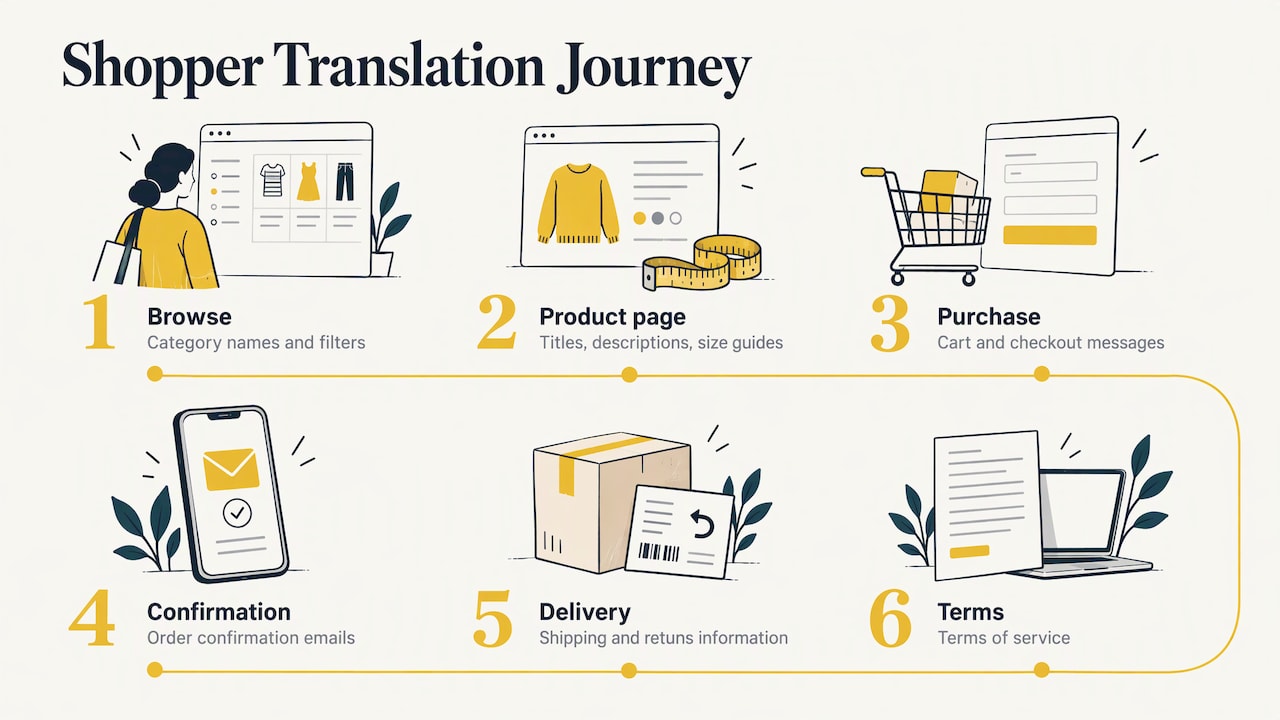
Ecommerce translation means translating the content a shopper meets between landing on your store and receiving the parcel: product titles and descriptions, size guides, category names, filters, cart and checkout messages, order confirmation emails, shipping and returns information, and terms of service.
It is not the same as localization. Shopify’s enterprise guide describes translation as the linguistic layer, while localization adapts the whole experience, including currency, payment methods, shipping and local legal compliance, so the store feels native. BigCommerce Australia adds the practical details: imagery, colors, date formats, measurement units, tax and shipping information, and address fields.
For many Australian sellers the first step is simply translation. You have a store that works in English, and you want Mandarin, Vietnamese, Arabic, Italian or Greek speakers to read it without guessing. Localization comes as you learn which markets actually buy.
A quick example
A Melbourne homeware shop adds a Simplified Chinese version. The translator renders “throw” as a blanket, not as the verb. The glossary fixes “duvet cover” to one term across every page. The size chart converts nothing, because the shop sells in Australia and ships in metric. But the delivery page now explains in Chinese how long parcels take to reach Perth and when GST is shown. That is translation plus a small amount of localization, and it is often all a first multilingual store needs.
What to translate first
You rarely need to translate everything on day one. Shopify’s guidance sets a clear order: the homepage, top product pages, checkout, and legal or policy pages first, then category pages and transactional email templates in a second tier (Shopify).
Here is how that looks as a working plan.
| Priority | Content | Why it comes here |
|---|---|---|
| Tier 1 | Homepage | First impression, and the page most visitors land on |
| Tier 1 | Top-selling product pages | They carry most of your revenue |
| Tier 1 | Cart and checkout | A single confusing line can cost the sale |
| Tier 1 | Returns, shipping, terms, privacy | Customers read these before they trust you with payment |
| Tier 2 | Category pages and filters | Navigation, and a major SEO surface |
| Tier 2 | Order and shipping emails | Reassurance after purchase, fewer support queries |
| Tier 3 | Long-tail products, blog, help center | Add as demand appears |
Two items people forget: error messages (“invalid postcode”) and image text such as banners or size charts saved as pictures. Both stay in English unless someone asks for them.
Human, machine or hybrid translation
This is the decision with the biggest effect on cost and quality. The research points the same way across sources: use machine translation for repeated, lower-risk catalog content, and human experts for high-visibility, creative, legal or regulated content (Shopify). BigCommerce Australia frames it as human translation for accuracy, machine translation for speed and cost, or a hybrid with machine output for bulk content and professional review for high-impact product and checkout content (BigCommerce).
| Content | Suggested approach |
|---|---|
| Homepage, hero banners, brand story | Human translation, with a native-speaker read |
| Best-selling product descriptions | Human translation or human review of machine output |
| Thousands of near-identical catalog entries (specs, attributes) | Machine translation, spot-checked |
| Checkout, payment and error messages | Human translation |
| Terms, returns, privacy, warranties | Human translation by a specialist |
| Customer emails | Human translation of templates, once |
Where machine output goes wrong
Machines handle “Black cotton T-shirt, size M” well. They struggle with a pun in a slogan, a product name that is also a common word, or a sentence such as “free returns within 30 days” where the wrong tense changes your promise. BigCommerce says human review matters most for product descriptions, marketing copy and checkout instructions, and treats quality as a conversion and trust issue (BigCommerce). Mistranslated policy text can also become a legal problem: when a customer shops online, all the usual consumer rights still apply, and the business must follow Australian consumer law, according to the ACCC. Policies that say something different in each language invite disputes.
A note on certified translation
A store’s marketing and product content does not normally need a certified translation. But the business behind the store often does. Supplier contracts, company registration documents, trademark paperwork, import licenses or a lease for a new premises may need certified translation when you submit them to an Australian authority or a foreign counterpart. In Australia, NAATI is the body that certifies translators, and official documents are typically expected to carry a NAATI-certified translation (Translayte’s overview). Always confirm with the receiving organization what it accepts.
Multilingual SEO: make each language findable
Translated pages that nobody finds earn nothing. Three technical basics matter.
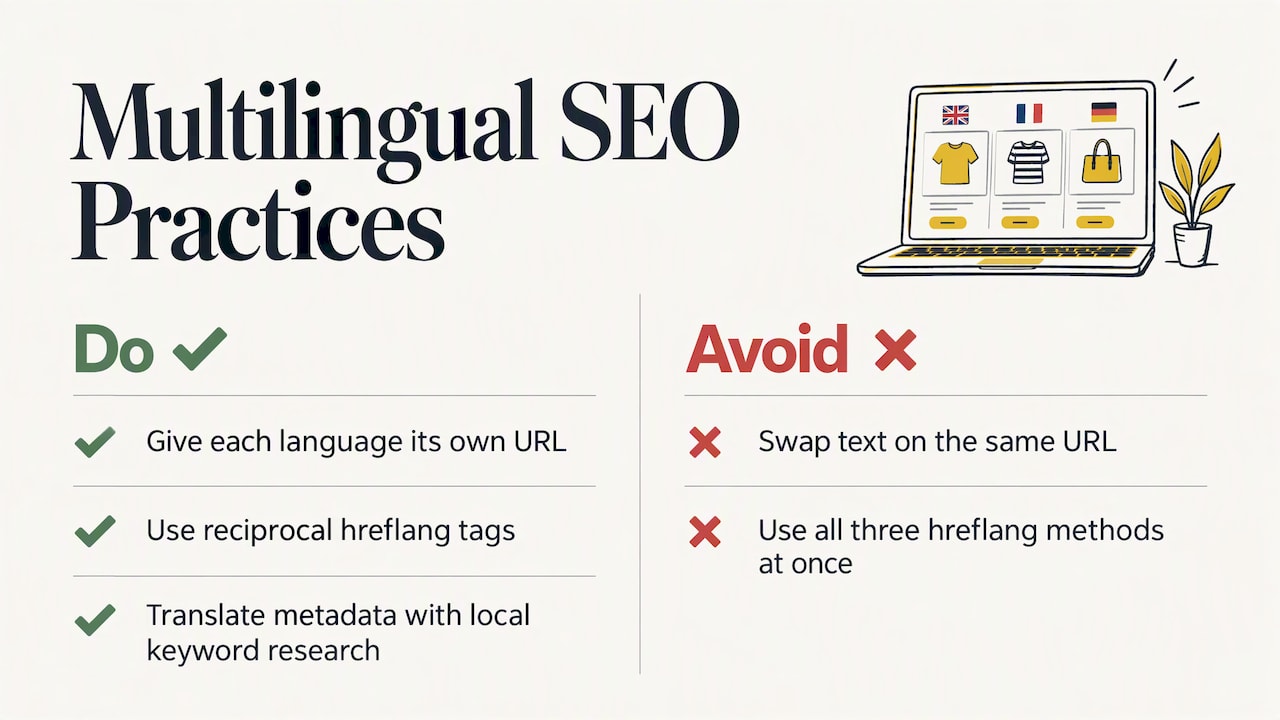
Give every language its own URL. For example, /zh/ or /it/ folders or separate subdomains. Do not swap text with a script on the same address, because search engines cannot index what they cannot reach.
Use hreflang correctly. Google explains that you can signal language and regional versions through HTML, HTTP headers or a sitemap, and that there is no benefit in using all three at once. It also says localized versions are considered duplicates only when the main content stays untranslated (Google Search Central). Tags need to be reciprocal (each version points to the others and to itself) and use correct codes such as en-AU (The SEO Company).
Translate the metadata too. Titles, meta descriptions, image alt text and URL slugs are where shoppers’ search words appear. Translate them with keyword research in the target language, not word for word from English. People searching in Vietnamese will not necessarily use the literal equivalent of your English keyword.
If you run on Shopify, its Markets feature is noted as generating hreflang tags, canonical URLs and sitemaps for international stores (Shopify Australia). Other platforms differ, so check what your plugin does before you assume it.
How an ecommerce translation project works
The steps below describe a typical project. Specific providers differ in tools and turnaround, so ask yours how it handles each one.
- Scope the content. List the pages, products and templates, the target languages and the word count. Decide the tier for each item (see the table above).
- Build a glossary and style guide. Record brand names that stay in English, the preferred term for each product category, tone (formal or friendly) and units.
- Export the content. Use your platform’s export function, a translation plugin, or a spreadsheet of product fields. Keep the structure (SKUs, HTML tags, placeholders such as
{{first_name}}) intact so the translation can be re-imported. - Translate and review. The translator works from the glossary. For hybrid projects, machine output is edited by a professional. A second linguist checks high-impact pages.
- Import and test in context. Load the text into a staging copy. Check that long German or Greek words do not break buttons, that right-to-left languages such as Arabic display properly, and that special characters survive.
- Publish with SEO in place. Add hreflang, translated metadata, and a visible language switcher.
- Maintain. New products, promotions and policy changes go through the same pipeline. A translation memory stores approved sentences, so you pay only once for repeated text and keep wording consistent.
Cost drivers
Most providers charge per word, and the rate varies by language pair, subject matter and urgency. Certified translations cost more than standard ones because the translator also certifies the result. For a rough idea of how our own pricing is structured, standard translation at Stellar Translations starts from $0.08 per word and certified translation from $0.12 per word. A catalog of 20,000 words at the standard rate is a different budget to a 2,000-word set of top pages, which is another reason to translate in tiers.
Keep quality consistent after launch
The hardest part of a multilingual store is not the first translation. It is the fifth price change, the next sale banner and the 300 new products added next season.
BigCommerce Australia recommends a terminology glossary, brand guidelines, translation memory or centralized multilingual management, professional review of important content, and native-speaker testing. It also suggests testing product pages, navigation, filters, cart, checkout, error messages, emails, shipping and returns, so untranslated or inconsistent content is found before release (BigCommerce).
In practice:
- Give each language one owner who approves wording changes.
- Translate promotions at the same time as the English version, not afterwards.
- Keep a list of strings that appear only in code or apps (“Add to bag”) so they do not stay in English.
- Run a full test purchase in every language each quarter.
If you also sell through marketplaces, the same discipline applies to listings. Keywords, bullet points and titles need to read naturally to the shopper, which is why work on Amazon listing optimization pairs well with a final quality check of translated copy and the buying steps around it.
Measure whether it works
Launching is not the finish. Watch analytics broken down by language. BigCommerce Australia notes that unusually high bounce rates can point to translation or cultural problems, and that Google Search Console shows indexing issues and hreflang errors (BigCommerce).
A simple dashboard per language is enough to start:
- Sessions and bounce rate on landing pages
- Add-to-cart rate and checkout completion
- Search impressions and clicks for translated pages
- Support tickets about confusing wording, delivery or returns
If one language has a good add-to-cart rate but poor checkout completion, look at the payment methods, shipping information and checkout wording first. Those are localization gaps rather than pure translation gaps.
Our perspective
We have translated documents since 2000, and the lesson that carries over to online stores is simple: the words people act on deserve a human who understands the subject.
A product description is a promise. A returns policy is a commitment. When a customer reads those in their own language, they are deciding whether to hand over a card number. We think those pages are worth a professional translator, working from a glossary, with a second pair of eyes on anything legal or technical.
That is why we focus on accuracy, confidentiality and fast turnaround, across more than 170 languages. For the long tail of a catalog, a sensible hybrid can save money. For the pages that decide the sale, we would not skip the human step.
Matthew
Work with Stellar Translations
If you are preparing an online store for new language markets, we can translate your priority pages and the business documents that sit behind them. Standard translation starts from $0.08 per word and certified translation from $0.12 per word, as published on our FAQ page, where you can also read about NAATI-certified translation. Legal, business and website translation are listed on our homepage.
Send us your product, checkout and policy text, and tell us the languages you are targeting. We will confirm scope and turnaround before work begins.
FAQ
What is the difference between ecommerce translation and localization?
Translation converts your text into another language. Localization goes further and adapts currency, payment methods, shipping, measurements, imagery and local legal requirements so the store feels native (Shopify). Most stores begin with translation and add localization market by market.
Can I just use machine translation for my whole store?
It works for large volumes of low-risk content such as specifications. It is a poor fit for checkout instructions, marketing copy and legal pages, where wording affects trust and obligations. A hybrid approach, with professional review on the pages that matter, is the common recommendation.
Do I need hreflang tags if I translate my store?
Yes, if the same store is available in several languages or regions. Hreflang tells search engines which version suits which user, and the tags should be reciprocal with correct codes (Google Search Central). Some platforms generate them automatically, so check before adding them by hand.
Does my store content need a NAATI-certified translation?
Generally no. Product pages and marketing text are not usually submitted to authorities. Certified translation matters for official documents, such as company, legal or immigration paperwork. Ask the organization receiving the document what it requires.
How do I keep translations consistent when I add products?
Use a glossary, a translation memory and one approval owner per language. Send new products and promotions through the same workflow as the original launch, and test a full purchase in each language regularly.
Sources
- Ecommerce Localization Strategy & Best Practices, Shopify
- Ecommerce Localization Strategy & Best Practices, Shopify Australia
- How to Build a Multilingual Ecommerce Website, BigCommerce Australia
- Hreflang for International SEO, The SEO Company
- Tell Google about localized versions of your page, Google Search Central
- Buying online, ACCC
- NAATI Translation, Translayte
- Amazon listing optimization, Sellucent